
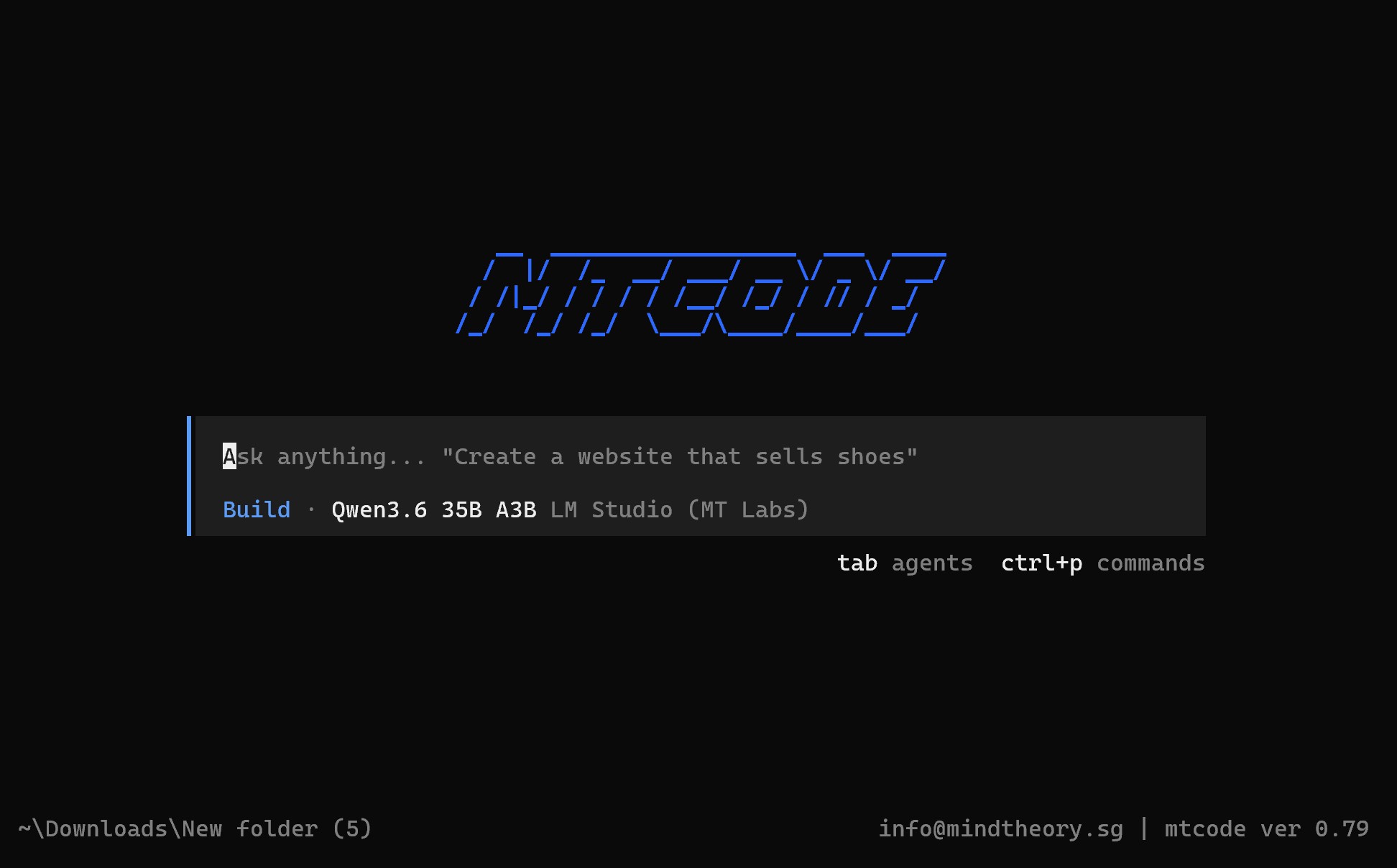
Most kids can describe an app they want. A snake game with custom rules. A trading card website for the cards they collect. A shopping list with colours for sweets and drinks. The wall they hit is the gap between the idea and the working code. MTCode CLI is the tool we built at Mind Theory to close that gap.
We just released it this month, starting with the students in our current vibe coding camps.
What MTCode CLI actually is
MTCode CLI (command line interface) is a coding terminal that runs on Windows PC or laptop. The student types what they want to build in plain English, something like “make me a Kanban board where I can drag yellow sticky notes between three columns”. MTCode CLI reads the request, writes the code, runs it, and fixes its own mistakes when something breaks. The student stays in charge the whole time, deciding what to build, what to change, what to ship.
Why we made our own
There are other coding CLIs out there, such as Claude Code CLI, Codex CLI, Qwen, Kimi, Opencode, Gemini CLI. They are all excellent tools, but they were built for senior software engineers with paid subscriptions, not for kids learning their first project. We wanted something different.
Based on opensourced Opencode repository, MTCode CLI is free for our students out of the box. It connects to the Mind Theory AI server by default, which means no parent has to hand over a credit card or set up an API key for a child to start building. Older students who already have an Anthropic, OpenAI, or Openrouter account can plug in their own paid API keys and use those instead.
The interface is also lighter. We stripped out the configuration menus and pro-engineer features that overwhelm a 12-year-old, and kept only what a student actually needs to ship a working app.
What students actually build
The fun begins once a student picks a project. Past students have built snake games with their own rules, faster snakes, growing obstacles, score screens that flash when a record breaks. Others have made Geometry Dash style web games with levels they designed themselves, complete with the spike traps and jump timing they thought would be most unfair to their friends.
A trading cards website is another favourite. Students learn how to make their own websites. A website is like their own shopping mall to the world. Next, grocery list apps are the popular practical one, the kind their parents can actually open on a phone and tick items off at the supermarket.
A Kanban board with draggable sticky notes is great for the students who like organising their to -do lists. Some use it for homework, some for keeping track of their sports or hobbies. Sporty students gravitate to fitness trackers that log their reps and show a weekly chart of how they are improving. Web games are the broadest category, anything from a retro space invaders game, to a platform side-scroller, to a quiz app for studying for an upcoming test.
Browse every app and game our students have built on our Student Showcase.
What ties all these projects together is that the student thinks of their idea, determines the gameplay or the layout, decides the rules, and chooses what looks right on screen. MT Code handles the coding.
The student is the orchestrator, AI is the assistant
This is the philosophy that runs through the whole vibe coding camp. AI does not replace the student, it gives them a superpower. The student is still the one who decides the rules of the game, the colour of the cards, what counts as a win, when the project is finished.
The AI is a fast pair of hands. The student is the one with the vision.
There is a real difference between a kid who uses AI to do their homework, and a kid who uses AI to build something they are proud of and want to demo at the dinner table. The first kid is hiding behind the tool. The second kid is using it the way an adult engineer uses it. We are training the second kind.

Coding does not end when camp ends
Every student in the vibe coding camp takes MT Code home on their own laptop. The project they started in class is the project they keep iterating on at home, adding levels, fixing bugs, showing it off to friends and family.
This is the part most parents tell us they appreciate. A normal coding camp ends, the kid forgets about the web apps they use, and the momentum dies inside a week. With MT Code, the momentum carries on for as long as the student wants to keep building. We have students who started with a snake game in class and ended up with a small portfolio of apps a few months later, all because the tool was still on the laptop and the curiosity was still there.
Build your first app at our next Vibe Coding camp
If you would like your child to build their first real app under the guidance of an instructor, our next vibe coding camp is the place to start. Students learn to use MT Code in person, ship a working project by the end of the camp, then take the tool home to keep going. Have a look at the upcoming dates here.

To see the CLI in a real classroom, read our recap of the Agentic AI Vibe Coding Workshop at Crescent Girls’ School, where students built their first online quiz and HTML game in the MTCode terminal.
Interested in bringing the vibe coding workshop to your school? Email us or WhatsApp us for a proposal and pricing.
Mind Theory is Singapore’s pioneering AI and creative-tech education provider, established March 2023, with hundreds of students across primary, secondary, and adult programmes. Read about Us.
FAQ
What is MTCode CLI?
It is a terminal by Mind Theory that lets students describe what they want to build in plain English, watch the AI write the code, and ship a working app. It is the tool we use in our vibe coding camps in Singapore.
Is MTCode CLI free for kids?
Yes. it is free for every student enrolled in our vibe coding camp, and they keep using it free at home after the camp ends. No subscription, no credit card, and no API key required.
What can my child actually build with MTCode CLI?
Past students have built snake games with custom rules, Geometry Dash style web games, trading card sites, shopping list apps, Kanban boards with draggable sticky notes, fitness trackers, retro space invaders, side-scrollers, and quiz apps. The student picks the project, MTCode CLI handles the programming.
Do parents need to set up an API key or pay for an AI account?
No. MTCode CLI connects to our Mind Theory AI servers by default, so no credit card or API key is needed for a child to start building. Older students who already have an Anthropic, OpenAI, or Kimi account can plug in their own paid API keys if they prefer.
How is MTCode different from Claude Code, Codex, Opencode, or Gemini CLI?
Those are excellent tools built for senior software engineers on paid subscriptions. MTCode is built specifically for kids learning their first project, with a stripped-down interface and free access through the Mind Theory AI server.
What kind of computer does my child need to run MTCode?
A Windows PC or laptop with an internet connection. Any modern Windows machine works, no gaming PC required.
Can my child keep using MTCode after the camp ends?
Yes. Every camp student takes MTCode home on their own laptop and keeps building. The momentum carries on for as long as they want, which is what most parents tell us they appreciate most.
Recent Articles
-
 Vibe Coding: The Enrichment Skill every School needs in 2026.
-
 The AI Literacy skill Your Teen’s Future Depends On – AI Coding
-
 Mind Theory launches MTCode IDE for Teen Vibe Coders
-
 Mind Theory launches MTCode CLI, a Terminal for Agentic Coding
-
 Best Holiday Camps in Singapore 2026: The Complete Parent’s Guide
-
 AI Sprint Holiday Camp Singapore | June 2026 (Ages 9-16)
-
 Discover Your Child’s Hidden Talents During School Breaks: A Practical Guide for Singapore Parents
-
 How to Use the School Break to Discover Your Strengths: A Guide for Curious Learners
-
 Coding, Editing or Design: Productive Holiday Skills to Learn
-
 5-Day AI Storytelling Camp
-
 CapCut Workshop for Singapore Schools | Secondary School Programme
-
 Generative AI Summer Holiday Camps
-
 September Holiday Camps – AI Art
-
 Roblox Coding Camp Singapore | 5-Day Holiday Camp for Kids
-
 AI Prompt Engineering Workshop for Singapore Schools | Mind Theory
-
 Z-Image in ComfyUI: 150 AI Fashion Models, One Studio Look
-
 MT SandBox: A Sandbox Game Mind Theorians Build Together
-
 ComfyUI Image Generation Training: Z Image, Flux, Qwen and Krea
-
 ComfyUI Image Editing Training: Relighting, Posing and LoRA Styles
-
 ComfyUI Video Training: LTX 2.5 and MiniMax H3
-
 Retro PC: Windows 95 in Your Browser