
Introducing Secondary 1 Students to Video Creation
Geylang Methodist Secondary School engaged Mind Theory to run a CapCut editing programme tailored for lower secondary students. We delivered the workshop across 2 batches of Secondary 1 classes, with 3 x 1 hour lessons each. The lower secondary format keeps the pace gentle and the focus practical, so younger students can build confidence quickly and walk away with real edits they can share. (Looking for our upper secondary version, with deeper filming theory and longer hands on sessions? See our CapCut Editing Workshop at Pei Hwa Secondary School.)
Lesson 1: Getting Started in CapCut
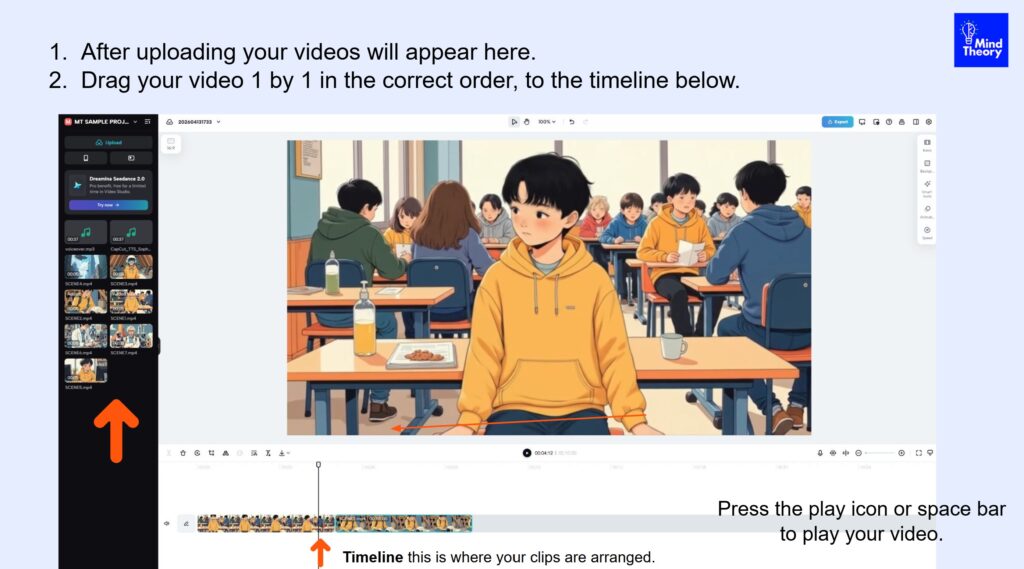
Students kicked off by signing in to CapCut and exploring the editor for the first time. We walked them through the user interface piece by piece, covering the Media Bin, Preview window, Properties panel, and Timeline so they understood what each area does and how they all work together.
Once the layout felt familiar, students uploaded our sample clips and made their first edits. They learned how to drop footage onto the timeline, arrange clips into a sensible order, and make their first cuts. By the end of the session, every student had a basic edit on screen and a clear sense of how the tool flows.
Lesson 2: Building a Complete Edit
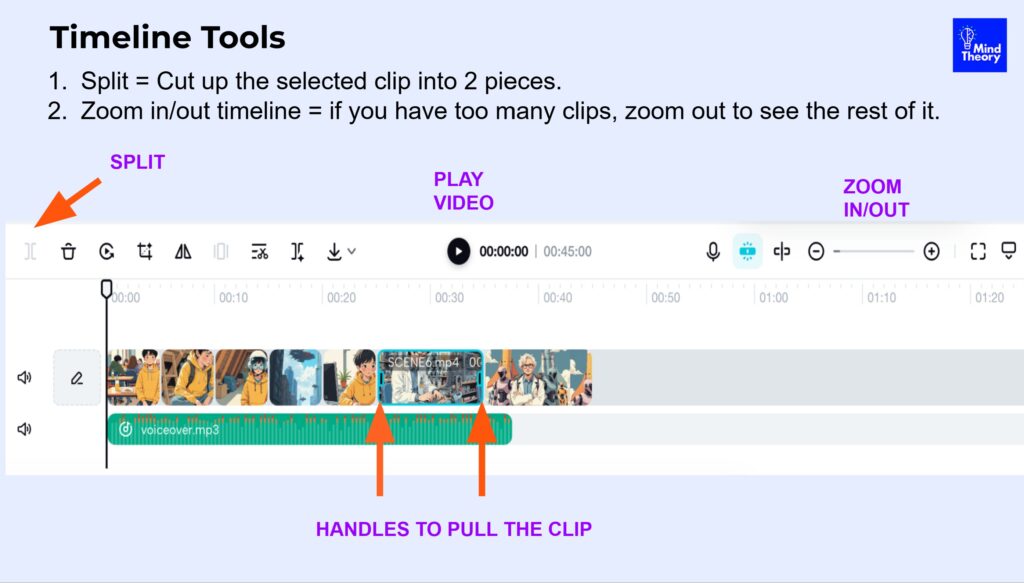
Students continued to edit and trim their video, learning how to tighten pacing, remove unwanted parts, and shape their footage into a smoother sequence. From there, we layered in audio. Students added voiceovers, sound effects, and background music to give their videos energy and polish.
They also created subtitles, which is one of the most useful skills for students producing content for social platforms where many viewers watch with the sound off. The lesson closed with a clear walkthrough of exporting, so students could save their finished videos in the right format for sharing.
Lesson 3: The Theory Behind Good Edits
With the hands on work behind them, the final lesson stepped back to cover the theory of editing. Students explored what video editing actually is, the basic rules of editing that guide every professional cut, an introduction to shot sizes, and the different types of videos they might create for school events, social media, or personal projects.
Placing theory at the end gave the concepts something concrete to attach to. Students could see exactly why each rule mattered, because they had already felt the difference in their own edits.
Summary
This CapCut Editing programme gave Geylang Methodist Secondary 1 students a confident first step into video creation. By starting with hands on practice and finishing with the theory, the workshop made editing feel approachable rather than technical, and equipped younger students with real skills they can use for school projects and beyond. We also offer an upper secondary version with deeper theory and longer sessions for older students.
If you’d like us to run this programme for your school, enquire now via Email or Whatsapp.

Recent Articles
-
 Vibe Coding: The Enrichment Skill every School needs in 2026.
-
 The AI Literacy skill Your Teen’s Future Depends On – AI Coding
-
 Mind Theory launches MTCode IDE for Teen Vibe Coders
-
 Mind Theory launches MTCode CLI, a Terminal for Agentic Coding
-
 Best Holiday Camps in Singapore 2026: The Complete Parent’s Guide
-
 AI Sprint Holiday Camp Singapore | June 2026 (Ages 9-16)
-
 Discover Your Child’s Hidden Talents During School Breaks: A Practical Guide for Singapore Parents
-
 How to Use the School Break to Discover Your Strengths: A Guide for Curious Learners
-
 Coding, Editing or Design: Productive Holiday Skills to Learn
-
 5-Day AI Storytelling Camp
-
 CapCut Workshop for Singapore Schools | Secondary School Programme
-
 Generative AI Summer Holiday Camps
-
 September Holiday Camps – AI Art
-
 Roblox Coding Camp Singapore | 5-Day Holiday Camp for Kids
-
 AI Prompt Engineering Workshop for Singapore Schools | Mind Theory
-
 Z-Image in ComfyUI: 150 AI Fashion Models, One Studio Look
-
 MT SandBox: A Sandbox Game Mind Theorians Build Together
-
 ComfyUI Image Generation Training: Z Image, Flux, Qwen and Krea
-
 ComfyUI Image Editing Training: Relighting, Posing and LoRA Styles
-
 ComfyUI Video Training: LTX 2.5 and MiniMax H3
-
 Retro PC: Windows 95 in Your Browser