
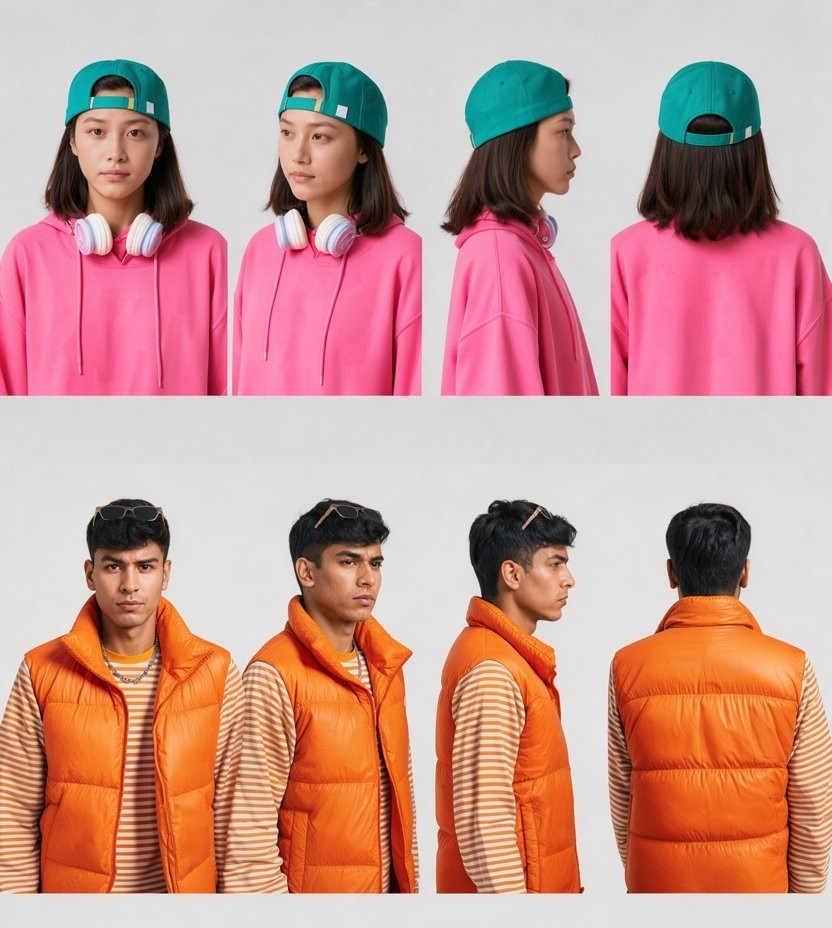
Give ComfyUI one photo of a character and it can now return a full ComfyUI character sheet: front, 3/4, side profile and back, drawn together in a single image. We built this multi angle workflow for MTBrain, Mind Theory’s own AI image generator, and tested it alongside two other edit experiments that put Qwen Image Edit 2.1 against Flux 3 Klein.
Everything below was made in ComfyUI on our own server in Singapore. The same tests are exercises in our ComfyUI course, where attendees learn these workflows on their own machines.
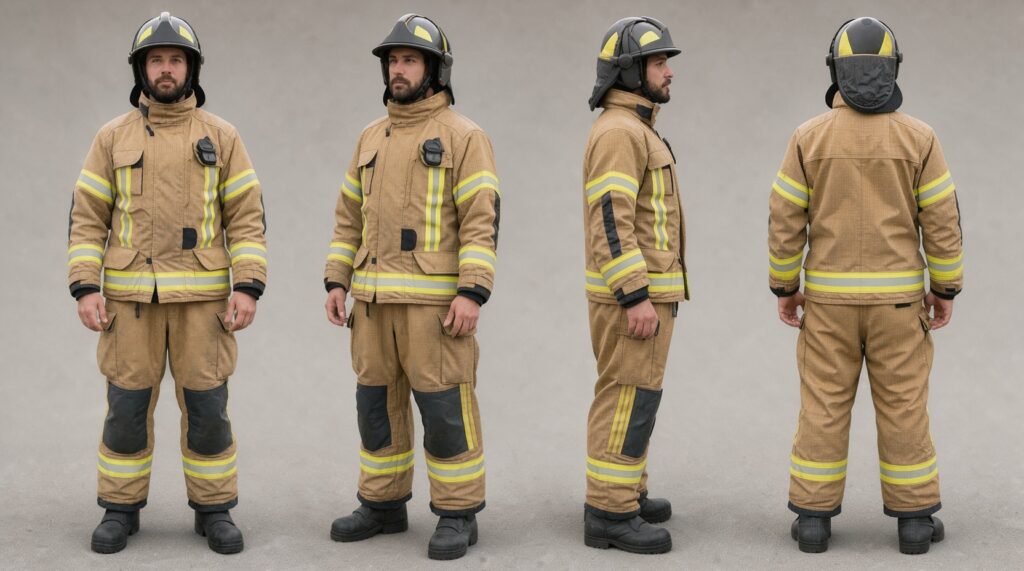
One photo of a firefighter in, a four-view turnaround out. Every view was drawn by the model in one image, not stitched together from separate renders.
The ComfyUI Multi Angle Character Sheet
A character sheet, or turnaround sheet, shows the same character from every side so it can be drawn, modelled or generated again consistently. Illustrators and 3D artists have always made these by hand. Our multi angle workflow makes one from a single photo in under half a minute, using Flux 3 Klein distilled.
Because the model draws all four views in the same image, the clothing, colours and proportions stay consistent from view to view. That makes the sheet useful for character design, consistent AI characters in comics and storyboards, fashion line sheets, and reference images for 3D modelling.
Full body character sheet
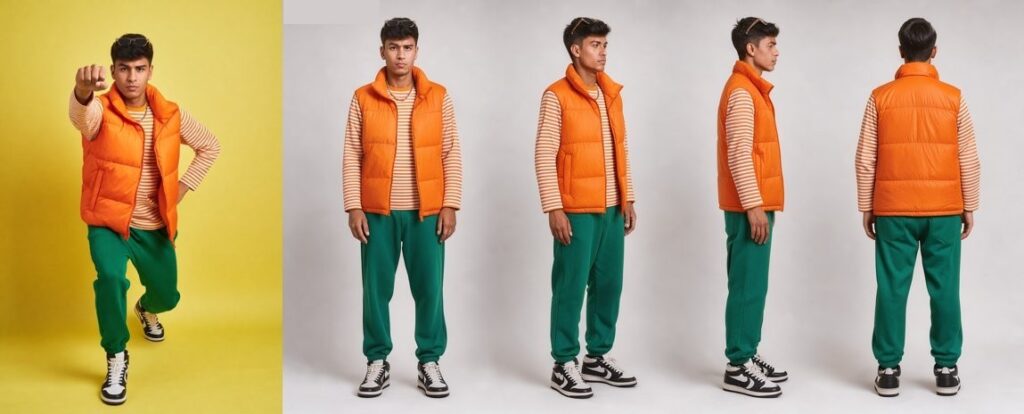
The source photo on the left is a dynamic pose on a yellow backdrop. The workflow returns a clean, neutral full-length turnaround of the same outfit, down to the striped sleeves and two-tone trainers, in about 26 seconds.
Close-up character sheet
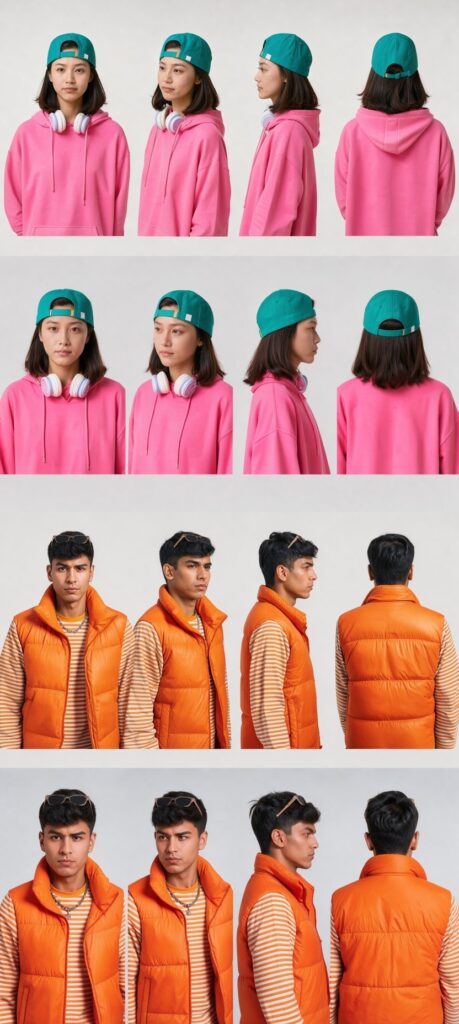
In a full-length sheet each face is small, so the model loosely redraws it. The close-up version crops at the chest, which keeps the face true to the source photo, and takes about 22 seconds. Our early close-up attempts had shoulders overlapping between views, and the final version keeps all four views separate. That is why we kept two versions: one for outfits, one for faces.
Honest limits
Small accessories can drift in the views the original photo never showed, such as the headphone band seen from behind. The layout varies slightly from run to run, and the workflow works best with a clear, well-lit photo of the whole subject.
Mind Theory is Singapore’s pioneering AI and creative-tech education provider, established March 2023, with hundreds of students across primary, secondary, and adult programmes. Read about Us.
Qwen 2.1 vs Flux 3: Two Edit Experiments
Before a workflow goes into MTBrain, we run the current open models on the same photographs and keep the one that holds up best. Two experiments decided the models behind our editing tools.
Experiment 1: moving a jogger from the city to the desert
We took a photo of a jogger on a city boardwalk and asked each model to place him on a desert path, keeping him identical, matching the light and adding a natural shadow. The desert itself was generated first, at the same camera angle as the original photo.
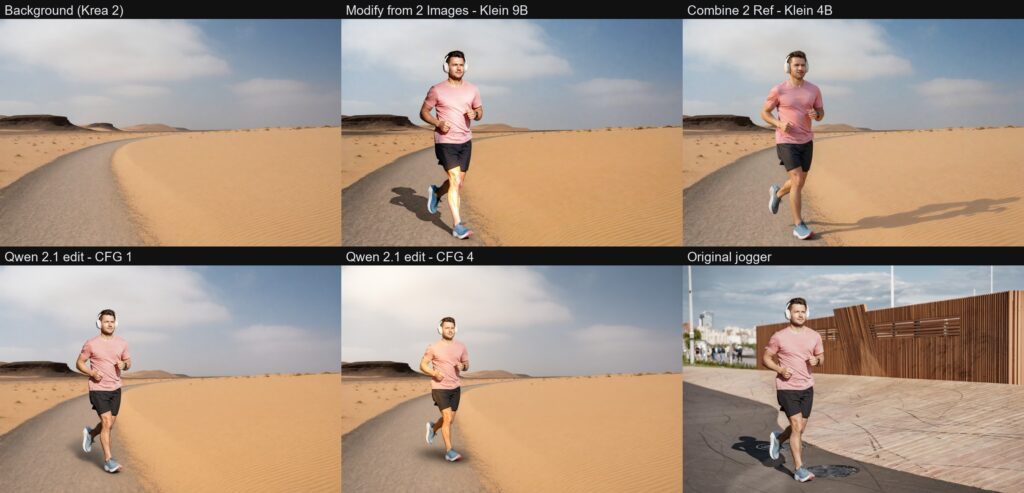
Top left: the desert background. Bottom right: the original jogger. In between: Flux 2 Klein 9B, Flux 2 Klein 4B, and Qwen Image Edit 2.1 at two settings. Look at the shadows: some point the wrong way, and some barely ground the runner at all.
The two strongest went head to head.
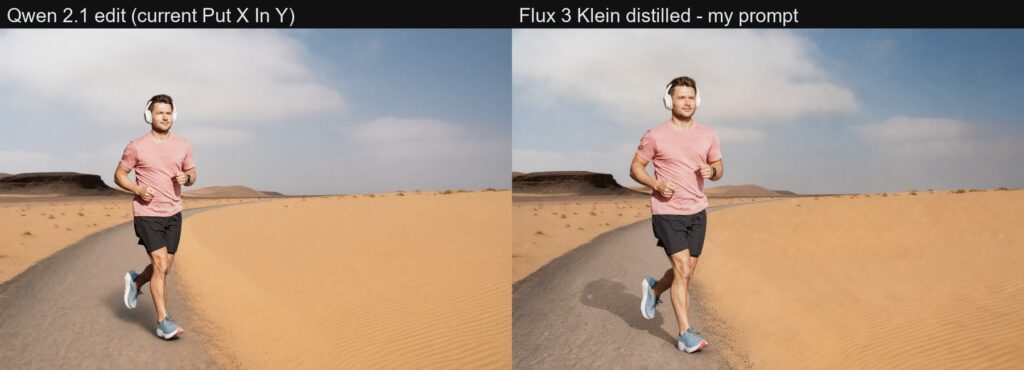
Qwen Image Edit 2.1 on the left, Flux 3 Klein on the right. Flux 3 Klein casts a believable shadow and matches the warm desert light on the skin, while the Qwen runner looks pasted on. Flux 3 Klein also uses about half the graphics memory, 12.8 GB against 22.9 GB.
Experiment 2: a firefighter copying the jogger’s pose
Next, we took a photo of a firefighter standing in front of his engine and asked the models to make him run like the jogger, keeping his face, uniform and fire station.
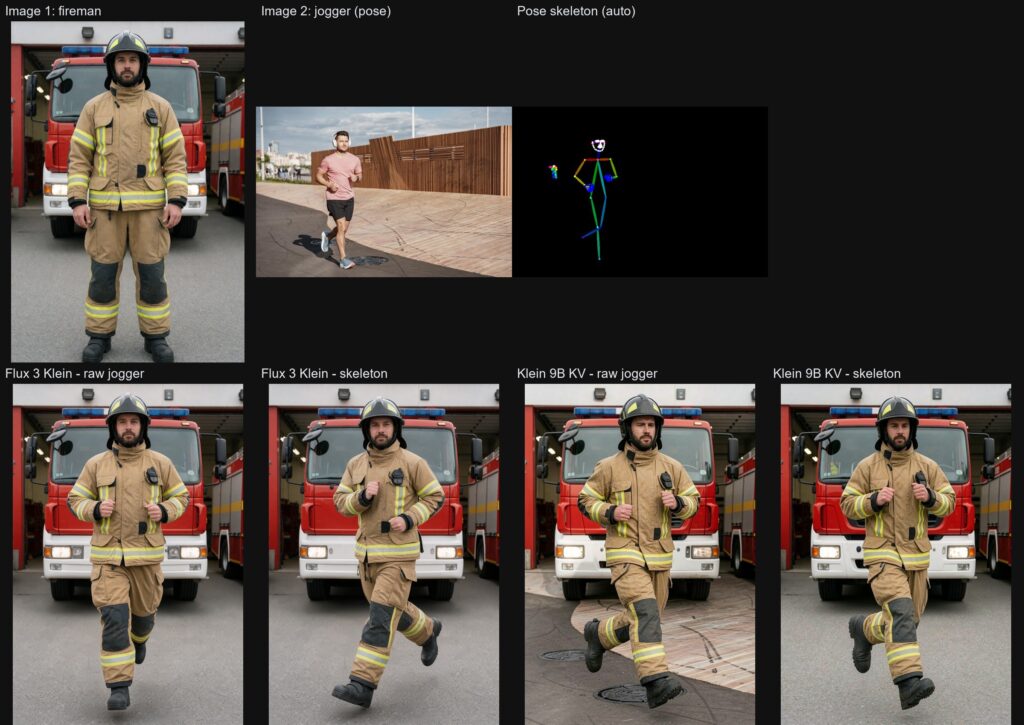
Top row: the firefighter, the jogger, and the stick-figure pose skeleton detected automatically from the jogger. Bottom row: Flux 3 Klein and Flux 2 Klein 9B, each given either the raw jogger photo or the skeleton.
The skeleton versions follow the pose far more closely. Given the raw photo, one model even copied the jogger’s pavement into the fire station, while a skeleton gives it nothing else to borrow. Adding a short written description of the pose tightened the result further. Flux 2 Klein 9B gave the most faithful running stride.
The verdict
Flux 3 Klein won the background swap on realism and memory, and also powers the multi angle character sheet. For copying a pose, Flux 2 Klein 9B with a pose skeleton was the most accurate. Qwen Image Edit 2.1 is still a capable model, but in these tests it did not match the light as convincingly and needed far more graphics memory.
Want to learn workflows like these in ComfyUI? Email us or WhatsApp us about the next ComfyUI class.
Now in MTBrain
All three workflows are now tools in the MTBrain image editor: Multi Angle (body and face), Put X In Y for placing people or products into new backgrounds, and Follow the Pose, with a sister tool, Follow Gesture, for hand gestures on half-body photos. Students in our camps and workshops use them in the browser, so no powerful computer is needed, and photos are processed on our own server rather than an outside AI service.
Learn These Workflows
Adults and company teams can learn these workflows on their own machines in our ComfyUI course. It covers comparing models on the same photographs, writing edit instructions that say what must not change, and using pose skeletons. For more edits, such as relighting and LoRA styles, see our ComfyUI image editing training. You can book a ComfyUI class, and companies can ask about ComfyUI corporate training for in-house teams.
More from this ComfyUI course series: turning images into video and AI image generation and image editing.
Established in March 2023, Mind Theory is Singapore’s pioneering AI education provider, offering Gen AI courses and corporate training for adults, working professionals and marketers.
Attendees build web apps through vibe coding and create production-ready AI visuals using prompt frameworks and AI-powered tools. To find out more, visit our Courses page.
Contact us to book a class by email or Whatsapp..

FAQ
What is a ComfyUI character sheet?
It is one image showing the same character from several angles, usually front, 3/4, side and back. Our ComfyUI multi angle workflow creates one from a single photo in about 22 to 26 seconds.
Which model makes the best multi angle character sheet?
We use Flux 3 Klein distilled. It draws all four views in one image, which keeps clothing and proportions consistent. A chest-up version keeps faces closer to the source photo.
Qwen Image Edit 2.1 or Flux 3 Klein: which is better for background swaps?
In our test Flux 3 Klein cast a more believable shadow, matched the light better and used about half the graphics memory, 12.8 GB against 22.9 GB.
How do I make a person copy a pose from another photo in ComfyUI?
Feed the model a pose skeleton detected from the reference photo rather than the raw photo, plus a short pose description. In our tests Flux 2 Klein 9B with a skeleton gave the most accurate result.
Can I learn these workflows?
Yes. Our ComfyUI course teaches adults and company teams these edit workflows on their own Nvidia GPU laptop or PC.
How big are the classes?
Classes are small, at around 5 to 7 students, so every attendee gets hands-on help with their own setup and images.
Do you run ComfyUI training for companies?
Yes. We run corporate group bookings and in-house training for creative teams. Please reach out via email or WhatsApp for a proposal.
How much does the ComfyUI course cost?
Pricing depends on the format and group size. Please reach out via email or WhatsApp for details.
Recent Articles
-
 Teaching COSTAR: GovTech’s Prompt Framework for Secondary School Students
-
 Jurong Secondary School Vibe Coding Competition: 250 Students, 8 Classes, 2 Days
-
 Vibe Coding: The Enrichment Skill every School needs in 2026.
-
 The AI Literacy skill Your Teen’s Future Depends On – AI Coding
-
 Best Holiday Camps in Singapore 2026: The Complete Parent’s Guide
-
 AI Sprint Holiday Camp Singapore | June 2026 (Ages 9-16)
-
 Discover Your Child’s Hidden Talents During School Breaks: A Practical Guide for Singapore Parents
-
 How to Use the School Break to Discover Your Strengths: A Guide for Curious Learners
-
 Coding, Editing or Design: Productive Holiday Skills to Learn
-
 5-Day AI Storytelling Camp
-
 CapCut Workshop for Singapore Schools | Secondary School Programme
-
 Generative AI Summer Holiday Camps
-
 September Holiday Camps – AI Art
-
 Roblox Coding Camp Singapore | 5-Day Holiday Camp for Kids
-
 AI Prompt Engineering Workshop for Singapore Schools | Mind Theory
-
 ComfyUI Multi Angle Character Sheet: Qwen 2.1 vs Flux 3 Tested
-
 AI Video Prompts: How We Teach Students to Direct an AI Camera
-
 AI Prompting Practice: How Students Learn to Write Effective Prompts
-
 MTCoder: An AI Coding Tool Built for School Coding CCAs