
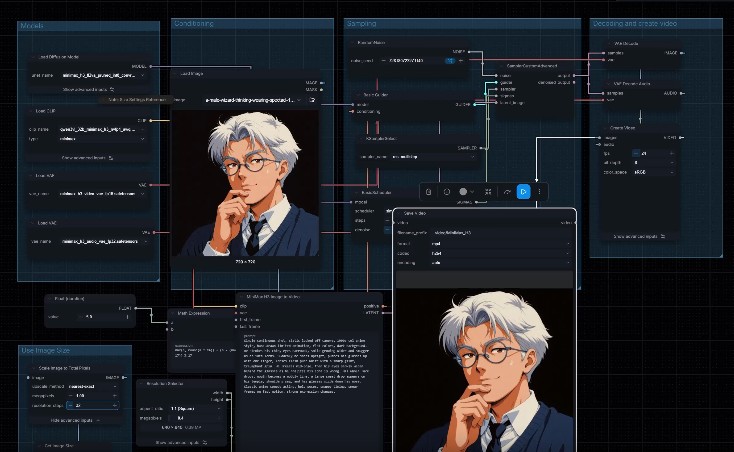
Turning a still image into a moving, directed shot is now something you can do on your own computer. Our ComfyUI video training teaches adults, company teams and enterprise creative departments image to video using the two strongest open models of 2026, LTX 2.5 from Lightricks and MiniMax H3, the model behind Hailuo 3. Taught by a creative director with over 20 years of advertising experience in motion and 3D, the course focuses on what working creatives actually need: directing performance, protecting a product, and getting a usable result without endless retries.
Below are the exercises we use in class, with the real clips our attendees learn to recreate. Every clip was made in ComfyUI on local hardware, which is the same setup you will have on your own laptop after the course.
Lesson Exercise: Same Image, Two Models
Attendees start with one photograph of a model holding a skincare tube and give both models the same direction: look at the product, smile, then look back at the camera, with a locked-off camera. Comparing the two results side by side is the fastest way to understand what each model is good at.
LTX 2.5 stays very close to the original frame. The face stays consistent, the camera does not move, and the tube stays upright with its label readable, which is exactly what a product shot needs. The trade-off is that the first beat of the direction, looking down at the product, is barely acted.
MiniMax H3 performs every beat in order: the glance down, the second hand coming up, the smile, the look back to camera. It feels like directing a real model on set. The label turns away as she handles the tube, so for packshots LTX 2.5 is the safer choice, and for performance MiniMax H3 wins.
Mind Theory is Singapore’s pioneering AI and creative-tech education provider, established March 2023, with hundreds of students across primary, secondary, and adult programmes. Read about Us.
Writing Prompts Like an Animator
The single most useful skill we teach for image to video is writing direction as timed beats. Instead of describing a mood, attendees write what happens from 0 to 2 seconds, what holds at the peak, and how the shot settles. These exercises show how far that technique goes.
A smile that builds
A short prompt: the expression builds from a gentle smile to a full laugh, while the hair, choker and pendant stay consistent with the original character.
A sneeze in four timed stages
The sneeze prompt was written like a timing sheet, and the model hit every stage, including the hair following through after the head snaps forward. This is squash and stretch, the same principle traditional animators use, applied through a prompt.
1990s cel anime comedy
Held poses, a lens flash on the glasses, a sweat drop and a slow realisation. Attendees learn how to keep a hand-drawn style from drifting into 3D, and how comedy timing is described in words.
A one-line prompt
Sometimes short is enough. A single sentence gives a full turn with flowing hair, and the character is still recognisable when her face comes back round. Attendees learn when a simple prompt works and when a scene needs full direction.
Want to direct shots like these on your own machine? Email us or WhatsApp us about the next ComfyUI class.
What the Course Covers
Installing ComfyUI and the video models on your own laptop, loading official image to video workflows, choosing resolution and duration, running quick low-resolution drafts before a full render, and knowing which model to use for which brief. LTX 2.5 outputs up to 4K and can create several connected shots in one generation, while MiniMax H3 leads on acting and follows timed direction closely.
Because everything runs locally, your source images and client work never have to be uploaded to a cloud service. For the full lesson plan, see our ComfyUI course. Companies can also book ComfyUI corporate training for their in-house teams.
More from this ComfyUI course series: AI image generation and image editing.
Established in March 2023, Mind Theory is Singapore’s pioneering AI education provider, offering Gen AI courses and corporate training for adults, working professionals and marketers.
Attendees build web apps through vibe coding and create production-ready AI visuals using prompt frameworks and AI-powered tools. To find out more, visit our Courses page.
Contact us to book a class by email or Whatsapp..

[/vc_row
A note on hardware: video models are far more GPU intensive than image models. To run LTX 2.5 and MiniMax H3 comfortably you will need a graphics card with 32GB of VRAM, such as the Nvidia RTX 5090 in a desktop PC. Laptops can create AI images, but they cannot generate video with these models. Please check your machine before signing up, and ask us over email or WhatsApp if you are unsure.
]
FAQ
What is the best AI video model to learn in ComfyUI?
We teach both LTX 2.5 and MiniMax H3. LTX 2.5 stays closest to the source image and outputs up to 4K, which suits product shots. MiniMax H3 follows acting direction more closely, which suits character and performance shots.
What computer do I need for ComfyUI video training?
A desktop PC with a 32GB VRAM graphics card, such as the Nvidia RTX 5090. Laptops can create AI images, but they cannot generate video with LTX 2.5 or MiniMax H3. We install everything on your own machine during the course, so it is ready to use at home afterwards.
Who is the ComfyUI course for?
Adults and working professionals, company teams and enterprise creative departments, including designers and marketers. No coding is needed, and complete beginners are welcome.
What do I need to bring?
For video, a desktop PC with a 32GB VRAM graphics card such as the Nvidia RTX 5090. For image generation and editing, a laptop or PC with an Nvidia GPU is enough. ComfyUI and its models are installed on your machine during class.
How big are the classes?
Classes are small, at around 5 to 7 students, so every attendee gets hands-on help with their own setup and images.
Do you run ComfyUI training for companies?
Yes. We run corporate group bookings and in-house training for creative teams. Please reach out via email or WhatsApp for a proposal.
How much does the ComfyUI course cost?
Pricing depends on the format and group size. Please reach out via email or WhatsApp for details.
Recent Articles
-
 Vibe Coding: The Enrichment Skill every School needs in 2026.
-
 The AI Literacy skill Your Teen’s Future Depends On – AI Coding
-
 Mind Theory launches MTCode IDE for Teen Vibe Coders
-
 Mind Theory launches MTCode CLI, a Terminal for Agentic Coding
-
 Best Holiday Camps in Singapore 2026: The Complete Parent’s Guide
-
 AI Sprint Holiday Camp Singapore | June 2026 (Ages 9-16)
-
 Discover Your Child’s Hidden Talents During School Breaks: A Practical Guide for Singapore Parents
-
 How to Use the School Break to Discover Your Strengths: A Guide for Curious Learners
-
 Coding, Editing or Design: Productive Holiday Skills to Learn
-
 5-Day AI Storytelling Camp
-
 CapCut Workshop for Singapore Schools | Secondary School Programme
-
 Generative AI Summer Holiday Camps
-
 September Holiday Camps – AI Art
-
 Roblox Coding Camp Singapore | 5-Day Holiday Camp for Kids
-
 AI Prompt Engineering Workshop for Singapore Schools | Mind Theory
-
 Z-Image in ComfyUI: 150 AI Fashion Models, One Studio Look
-
 MT SandBox: A Sandbox Game Mind Theorians Build Together
-
 ComfyUI Image Generation Training: Z Image, Flux, Qwen and Krea
-
 ComfyUI Image Editing Training: Relighting, Posing and LoRA Styles
-
 ComfyUI Video Training: LTX 2.5 and MiniMax H3
-
 Retro PC: Windows 95 in Your Browser